GraphEditor
The StateGraph is a editor that manage and edit State transitions in the (StateMachine)[StateMachine] without writing code.
There is two types of transitions you can create and edit: connexions and standalone triggers. Whenever the prerequisites of the transition are fulfilled, the StateMachine will automatically change its state accordingly.
Connexions consists of a link between two States with an arrow to indicate the direction of the connexion. The connexion connects a From State to a To State.
You can add them by right clicking on a State Node in the graph, dragging and releasing the click on the destination node.
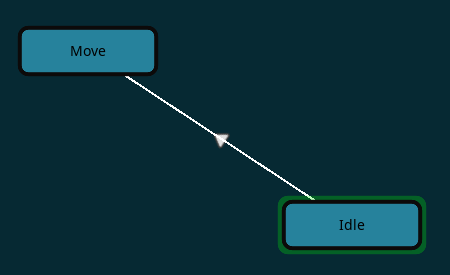
If the prerequisites are fulfilled, and the current_state of the StateMachine is the Form State of the connexion. The StateMachine will change its state to the To State.
You can edit a connexion by clicking on it, and then
The prerequisites consists of one or more Events. Events defines when the connexion should be checked. Its Trigger value defines the signal that should be awaited for and the Emitter Path, the path to the node emitting the signal, relative to the From State. By default the Emitter Path will be the path to the root of the scene.
If the Trigger is set to process the event will be check at each physics tick.
Events can also carry as many Conditions you want.
Conditions consists of a Condition String that must be a condition you would write in GDscript like velocity.y > 0.0 for exemple.
Conditions also have a Path that defines to which node the condition should be asked to. By default the path is the path to the root of the scene too.
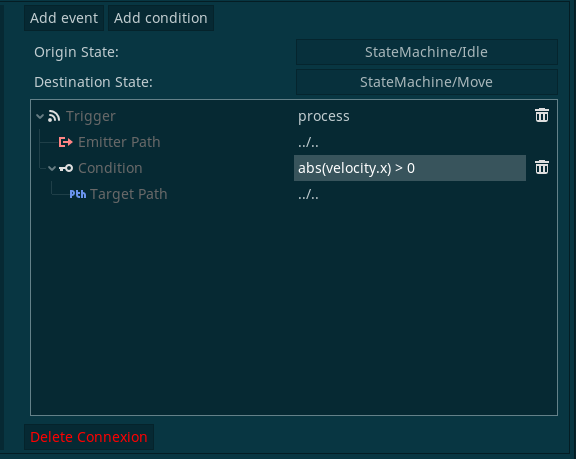
Whenever an Event is called, if all its conditions are true; the StateMachine will operate the transition.
A connexion might carry multiples Events. Only one need to be fullfiled at a time for the transition to operate.
The way this system is designed prevents you from making too much spaghetti with your graph, as only one connexion can carry all the events & conditions you need.
Connexions conditions & events are checked only when the StateMachine's current_state is the From States of the connexion.
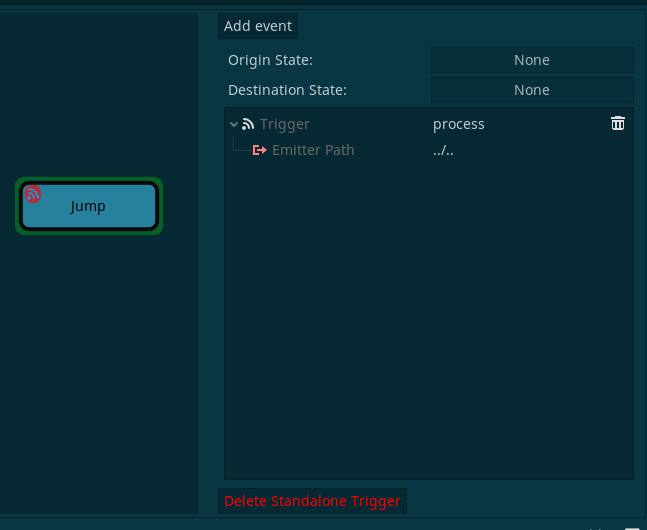
Standalone triggers works in a very similar way connexions does. It uses the same event & conditions system, but the difference is that their Events are triggered, no matter what state the StateMachine is in.
You can add them by selecting a State node in the graph, then clicking the Add standalone trigger button a the top left of the GraphEditor.
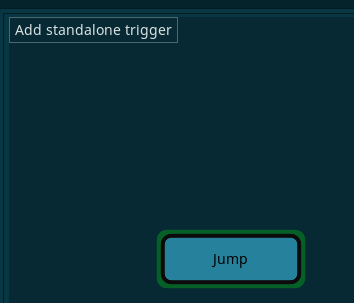
Once you have done that, an icon will appear on the top left corner of the state node. If you select it, you can edit the standalone trigger exactly the same way you would for connexions.